Lesson 08 — Safe and Kind Online
The unit's capstone teaches safe and kind behavior online. Learners sort what is private from what is okay to share, learn never to share private information, practice being kind online, and learn to stop and tell a trusted adult when something feels wrong. The tone is calm and empowering — the internet is a tool, and they hold the power to use it well.
Objectives
Objectives
- D03.S4.04.02 Explain safe and respectful behavior online, including not sharing private information, and where to get help.
Essential question
How do I stay safe and be kind online, keep my private information private, and get help when I need it?
Key vocabulary
Materials
Standard materials
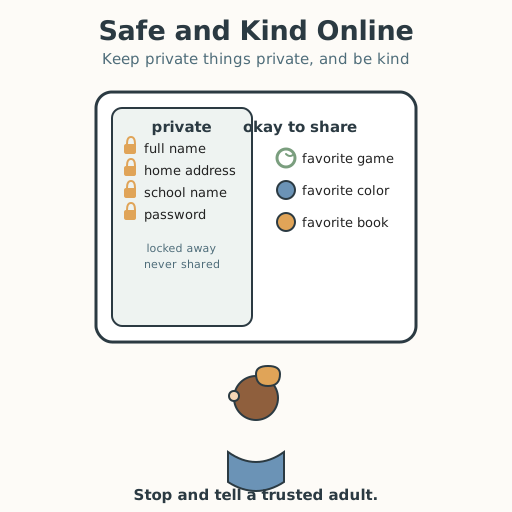
- "Private or not?" sorting cards · 1 set Cards with items to sort — your full name (private), your home address (private), your school's name (private), your favorite game (okay to share), your favorite color (okay), a password (private) — pictured, not only written
- A "kind online" reminder chart · 1 Rules — treat people online as kindly as in person; if something feels wrong, stop and tell a trusted adult; never meet an online stranger alone
- Paper and crayons · per learner To draw an online-safety pledge
Low-tech / no-cost
- Voice and body Sort "private or not" aloud and practice saying "no, that's private" and "I'll tell a trusted adult"; no device needed
- A drawn screen Draw a pretend screen in the dirt or on paper and point to what you would and would not type
Enriched / lab & device
- A real or pictured device screen · 1 A tablet, phone, or picture of one, to practice the "private or not" sort on a real-looking screen
- An online-safety picture book or poster · 1 A story or poster about keeping private information private and telling an adult
Works in different contexts
- large-group Sort the cards together at the front, practice the "tell a trusted adult" phrase as a group, then let learners draw their pledge
- self-directed A learner sorts the cards, writes the rules, and draws or writes a personal online-safety pledge
- outdoor-only Discuss the rules in a circle and sort "private or not" by standing in one of two marked circles; make the pledge aloud
- multi-age Older learners read the cards and model the "tell a trusted adult" script while younger learners sort and repeat it
- level-grouped Learners who can explain why private information must stay private teach it back; others match each card to "private" or "okay to share" with support
Lesson 8 — Safe and Kind Online
Summary
The unit’s capstone teaches safe and kind behavior online. Learners sort what is private from what is okay to share, learn never to share private information, practice being kind online, and learn to stop and tell a trusted adult when something feels wrong. The tone is calm and empowering — the internet is a tool, and they hold the power to use it well.
Objectives
- Explain safe and respectful behavior online, including not sharing private information, and where to get help. (D03.S4.04.02)
Connection
The internet can feel like a big, exciting world — games, videos, chats, and messages. Just like the real world, it is mostly full of good things, and it also has a few simple safety rules. You would not tell a stranger on the street your full name and address; online you use the same good sense. Today you will learn what to keep private, how to be kind, and exactly what to do if something feels wrong.
Materials
- “Private or not?” sorting cards
- A “kind online” reminder chart
- Paper and crayons
Preparation
- Prepare the “private or not?” cards (full name, home address, school’s name, password = private; favorite game, favorite color = okay to share).
- Prepare the “kind online” chart and the “tell a trusted adult” script.
- Read the facilitator note fully; keep the tone calm and empowering, never frightening.
Facilitator note
This lesson is written to the learner (“you”). Empower, never frighten. Teach the rules simply and positively:
- Keep private information private. Private information is what could let a stranger find or pretend to be you: your full name, home address, school’s name, password, and your photo (decide with your grown-up). Things like a favorite color or game are usually okay to share. A password is a secret word that guards your accounts — never share it with anyone but a trusted grown-up.
- Be kind online. Treat people online as kindly as you would face to face. If someone is unkind, do not answer back with cruelty; tell a trusted adult.
- Stop and tell. If anything online feels wrong, scary, or confusing — a stranger asking private questions, an unkind message, a request to meet — stop, close it, and tell a trusted adult. Never meet an online stranger alone, and never keep a secret that makes you feel bad.
Frame all of this as power, not danger: the learner is the boss of their information and their words. Do not share frightening stories of online harm; if a learner asks, answer briefly and calmly and return to the rules. Honor that many learners have no device at home — the rules apply to any screen, at home, school, or a friend’s. If a learner discloses that someone has asked them for private information or to meet, follow your local safeguarding procedure calmly and immediately. A learner who is blind or has low vision sorts by hearing each item and saying “private” or “okay”; a learner who does not use a speaking voice points or signs; a learner who is deaf or hard of hearing follows the cards and demonstration from the front, since every rule is shown, not only told. This guidance reflects widely used online-safety education for children (keep personal information private, be kind, and tell a trusted adult), as promoted by UNICEF and child-safety organizations. This lesson completes D03.S4.04.02 and closes the unit.
Procedure
- Gather (5 min). The internet is a tool, like a road or a pool — wonderful when you know the rules. Today you learn the rules for being safe and kind online.
- Private or not? (15 min). Some things are private information — details that could let a stranger find you or pretend to be you: your full name, home address, school’s name, and password. Some things are okay to share: your favorite game or your favorite color. Sort each card: private, or okay to share? Remember: never share private information online.
- Be kind online (10 min). Online, words reach real people. Treat people as kindly as you would face to face. If someone is unkind, do not be cruel back — walk away and tell a trusted adult. Practice a kind message: “That was a fun game! Thanks for playing.”
- Stop and tell (10 min). If anything online feels wrong — a stranger asking private questions, a scary message, a request to meet — stop, close it, and tell a trusted adult. You are never in trouble for telling, and you should never meet an online stranger alone. Practice saying it: “I will tell a trusted adult.”
- Make your pledge (5 min). Draw or write your online-safety pledge: “I keep my private information private. I am kind online. If something feels wrong, I stop and tell a trusted adult.”
- Close (5 min). Say it together: “I am the boss of my information and my words. I am safe and kind online, and I tell a trusted adult when I need help.”
Differentiation
- Support: Sort a few cards first (full name, favorite color) and model the “tell a trusted adult” phrase; accept spoken, pointed, or drawn answers.
- Support (non-speaking): Point to the “private” and “okay” areas and to the trusted-adult picture for each item.
- Support (blind/low-vision): Hear each item and say “private” or “okay”; repeat the pledge aloud.
- Extension: Write three things that are private and explain why a password must never be shared, and name two trusted adults to tell in order.
Assessment
- Formative (observation): Can the learner sort private from shareable information and say, in their own way, what to do if something feels wrong online?
- Portfolio: The online-safety pledge, kept in the unit portfolio.
- Self: The learner names one piece of private information and one trusted adult they would tell.
Home connection
With a grown-up, name the things your family keeps private online and who you would tell if something felt wrong. Agree together on one kind rule for your family’s screens.
Resources
- UNICEF, “Keeping children safe online” (keep personal information private and tell a trusted adult): https://www.unicef.org/protection/violence-against-children-online
- International Telecommunication Union, “Child Online Protection” (children’s online safety guidance): https://www.itu.int/en/ITU-D/Cybersecurity/Pages/COP.aspx