Lesson 04 — Framed and Edited: How a Picture Changes Its Meaning
Learners analyze how a **photo, video, or story can be framed or edited to change its meaning** — by cropping, captioning, and choosing context — and learn **how to check it**: ask what is cropped out, what the caption claims, and where the picture really came from. The skill is not distrust of every image but honest checking of each one.
Objectives
Objectives
- D10.S2.08.01 Analyze how a photo, video, or story can be framed or edited to change its meaning, and explain how to check it.
Essential question
How can a photo, video, or story be framed or edited to change its meaning, and how do I check it?
Key vocabulary
Materials
Standard materials
- Framing-and-editing sheet · 1 per learner A sheet with one photo shown two ways (two crops, two captions) and a space to write how each changes the meaning
- Checking checklist · 1 per learner A short list of checks — what is cropped out? what does the caption claim? where and when was it taken? what does the original source say?
Low-tech / no-cost
- A shared board or large paper Draw the same scene cropped two ways and discuss how each changes the story
- Voice and a partner Describe the same event in two different framings aloud and compare
- A spoken "framing" of one event (no image) Tell one real event two ways — leaving out a key detail versus including it — so the lesson works by listening for learners who do not see the pictures
Enriched / lab & device
- A computer or tablet with image search · 1 per group Practice a reverse image search to find where a picture originally came from
- Two real news photos of one event with different captions · 1 set Compare how the caption and crop change the story each tells
Works in different contexts
- large-group Show one photo cropped two ways to the whole group, then small groups write the two meanings and share
- multi-age Younger learners say what each picture shows; older learners explain how the crop or caption changes the meaning
- self-directed A learner fills the sheet alone and applies the checklist to one real image of their choosing
- level-grouped Learners ready to extend find a real image online and check it with a reverse image search
- outdoor-only Stand in one spot and "frame" the same scene with your hands two different ways, then say how each changes what a viewer would think
Lesson 4 — Framed and Edited: How a Picture Changes Its Meaning
Summary
Learners analyze how a photo, video, or story can be framed or edited to change its meaning — by cropping, captioning, and choosing context — and learn how to check it: ask what is cropped out, what the caption claims, and where the picture really came from. The skill is not distrust of every image but honest checking of each one.
Objectives
- Analyze how a photo, video, or story can be framed or edited to change its meaning, and explain how to check it. (D10.S2.08.01)
Connection
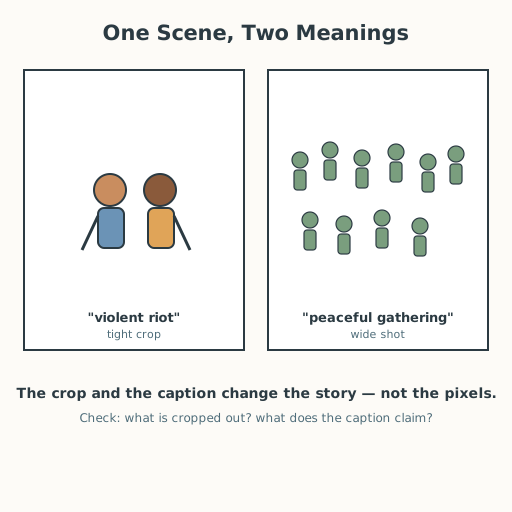
A picture can be completely real and still tell a false story. Crop a crowd tightly and a small scuffle looks like a riot; pull back and it is a mostly peaceful day. Add one caption and the same photo becomes “fans celebrate” or “protesters clash.” The photo never lied — the framing did. Today you learn to see the frame, and to check what is outside it.
Materials
- Framing-and-editing sheet
- Checking checklist
Preparation
- Copy the sheet and checklist.
- Retrieval: from Lesson 1, recall what makes a source trustworthy; from Grade 7, recall misinformation versus disinformation. Today we look at the image side.
Facilitator note
This lesson is written to the learner (“you”). The idea to land: meaning lives in the frame, not only in the image. Three moves change meaning without any “faking”: (1) cropping — leaving out what is outside the frame; (2) captioning — telling the viewer what to think it shows; (3) context — pairing an image with the wrong place, time, or event (a real photo from one protest attached to a different one years later). The checking skill (S-217, S-151): ask what is cropped out, what the caption claims, and where the picture really came from — find the original with a reverse image search or by tracing the source, and check it against independent reporting. The ethics lens: changing a picture’s meaning to mislead is a choice with consequences — it can inflame fear or blame real people. The egalitarian lens: who is shown, and who is cropped out, is never neutral — a crowd “of peaceful people” or “of rioters” changes whose story is believed. The global lens: the same framing tricks work in every language and country; media literacy is a global skill (S-217). The technology lens: editing tools that once needed a studio now sit in every pocket, which makes checking more necessary, not less. Keep examples real and age-appropriate; never ask learners to relive trauma. The goal is the habit of checking, taught with worked examples before independent practice (S-011).
Procedure
- Recall (5 min). What makes a source trustworthy? (We can trace it and check it.) Images are sources too.
- Meet the three moves (10 min). A photo’s meaning can change three ways: crop (what is left out), caption (what the words tell you to see), and context (the wrong time or place). Say each in your own words.
- Worked example (10 min). Look at the sheet: one crowd scene, two crops. Cropped tight, it looks like a fight; pulled wide, it is mostly calm. With two different captions, the meaning flips again. Say exactly what changed.
- Check it (15 min). Use the checklist: What is cropped out? What does the caption claim? Where and when was it taken? What does the original source say? For a real image, find the original with a reverse image search.
- Practice (7 min). Apply the checklist to one more image (from the sheet or one you found). Write your verdict: “This image likely shows ___, because ___.”
- Close (3 min). You don’t have to distrust every picture — just check each one the way you’d check a stranger’s story.
Differentiation
- Support: Provide the checklist with one row pre-filled and ask the learner to complete the rest.
- Extension: Find a real image online, run a reverse image search, and write a short report on where it really came from.
- Access (non-visual): The whole skill can be taught by listening. A partner reads two written accounts of one event — one that leaves out the crowd’s calm majority, one that includes it — and the learner names what was “cropped out” (left out of the story). “Framing” a story is leaving out facts, and checking is tracing the source and comparing independent reports, which needs no sight.
Assessment
- Formative (observation): Can the learner name at least one framing move (crop, caption, context) and one check for it?
- Portfolio artifact: The completed framing-and-editing sheet with a written verdict, kept in the portfolio.
Home connection
Find one photo in a feed or a newspaper and ask: what might be outside the frame, and what does the caption want me to believe? Share your thinking.
Resources
- On media and information literacy and how to read messages critically: UNESCO, “Media and Information Literacy,” https://www.unesco.org/en/media-information-literacy (S-217).
- On key questions to ask when analyzing media messages: NAMLE (National Association for Media Literacy Education), https://namle.org/ (S-151).
- On news and media literacy for learners: Common Sense Education, https://www.commonsense.org/education/ (S-063).
- On explicit instruction and worked examples: Kirschner, Sweller & Clark (2006), https://doi.org/10.1207/s15326985ep4102_1 (S-011).