Lesson 03 — Creating Music with Digital Tools
Learners build a short piece of music in a free digital tool: they choose a loop or make a beat, add a melody, and layer at least one more track, then apply one effect such as reverb or echo. They reflect on how the technology shaped the sound — loops, perfect timing, effects, and undo — and how that differs from playing live.
Objectives
Objectives
- D07.S2.09.01 Create music using digital or recording tools and reflect on how the technology shaped the sound and the process.
Essential question
How do I create music with digital or recording tools, and how does the tool shape the sound and the process?
Key vocabulary
Materials
Standard materials
- A device with a free music tool (BandLab, GarageBand, Audacity, or any browser-based sequencer) · 1 per learner or pair Free and browser-based tools keep the lesson accessible (S-443, S-444)
- Headphones or a shared speaker · 1 per pair For listening to the emerging piece
Low-tech / no-cost
- Body percussion, voice, and found objects (pots, bottles, sticks) Build the piece by layering recorded claps, hums, and taps — "recording" by memory and repetition
- A paper "timeline" chart Draw tracks as rows and place marks where each sound repeats, standing in for a digital timeline
Enriched / lab & device
- A MIDI keyboard or pad controller · 1 per learner To play notes in instead of clicking them
- A class listening session on one speaker · 1 To share the finished pieces and compare tool choices
Works in different contexts
- large-group Model building a loop on one shared screen, then learners work in pairs with headphones
- multi-age Younger learners make two loops and layer them; older learners add a third track and an effect and explain each
- self-directed A learner follows the worked example in the Procedure alone and writes the reflection
- level-grouped Learners ready to extend record a live voice or instrument on top of their loop and describe what changed
- outdoor-only Record the sounds of the place itself (water, wind, birds, footsteps) and layer them into a piece — a "field recording" composition
Lesson 3 — Creating Music with Digital Tools
Summary
Learners build a short piece of music in a free digital tool: they choose a loop or make a beat, add a melody, layer at least one more track, and apply one effect such as reverb or echo. They close by reflecting on how the tool shaped the sound and the process — the loop’s repetition, the grid’s perfect timing, the undo that erases a mistake — and how that differs from singing or playing live, where the body and the moment cannot be clicked away.
Objectives
- Create music using digital or recording tools, and reflect on how the technology shaped the sound and the process. (D07.S2.09.01)
Connection
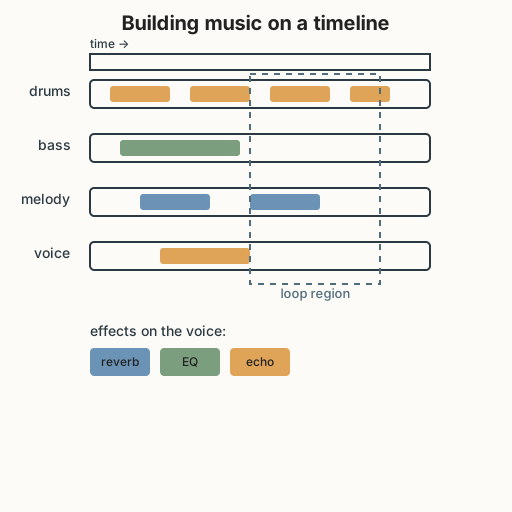
Every song you have ever loved was built the same way a wall is built — one brick at a time. A beat is laid down, then a bass line, then a melody, then a voice, each one a track stacked on the last. Long before computers, musicians layered parts by playing together; a digital tool lets one person be the whole band, laying each part down alone and listening back. Today you become that one-person band and hear how the tool changes what music can be.
Materials
- A device with a free music tool (BandLab, GarageBand, Audacity, or a browser sequencer)
- Headphones or a shared speaker
Preparation
- Open the tool once yourself and confirm a loop library or simple instrument is available; find where the tempo and one effect (reverb/echo) live.
- Retrieval: from Grade 8, recall that a style or tradition is a set of choices — instrumentation, rhythm, and form. Today we make choices with a tool.
Facilitator note
The goal is one short piece (30–60 seconds) plus a reflection, not virtuosity. Keep tools free so no learner is left out (the egalitarian lens): BandLab runs in a browser and Audacity is a free, open-source recorder/editor (S-443, S-444). The worked example matters here — building a track is a new skill, so model the exact steps (choose loop → add melody → add track → add effect) before independent work (S-011). The technology lens is the heart: ask what did the tool let you do that a live body could not (loop forever, undo, quantize to a perfect grid, stretch a note) and what did it take away (breath, the wobble of a real hand, the room’s echo). The ethics lens: if learners borrow a loop or sample, credit its creator and respect its license — sampling with credit is a tradition; sampling without credit is taking. The global lens: invite learners to begin from any rhythm or scale they know — a djembe pattern, a salsa clave, a hip-hop break — as a respectful starting point, not a costume.
Procedure
- Set up (5 min). Open the tool and set a tempo. Look at the timeline diagram: tracks are rows, and the clips you place on them are the “bricks.”
- Make the first track (10 min). Worked example, follow along: choose or make a loop — a drum beat or a short rhythm that repeats. Place it on the first track and press play. This repetition is the floor of your piece.
- Add a melody (15 min). On a second track, add a melody — click notes or play them in. Keep it short; a melody is a sentence, not a speech.
- Layer and shape (15 min). Add one more track (a bass line, a pad, a voice, or a field recording). Then apply one effect to any track — reverb makes it sound far away, echo repeats it, EQ brightens or darkens it. Change the tempo once and notice what happens.
- Reflect (10 min). Write three sentences: what tracks you built, one thing the tool let you do that a live body could not, and one thing live music has that your piece does not.
Differentiation
- Support: Start from a provided two-loop template and add only a melody.
- Extension: Record a live voice or instrument over the loops and describe in one sentence how it changed the feeling.
- Access (Deaf / hard of hearing): Build the piece as a visible rhythm — place clips on the timeline and follow the moving playhead, watch a waveform, feel the pulse by resting a hand on the speaker, or sign/gesture each part. The track grid and effect labels are the music here, not only the sound.
Assessment
- Formative (observation + artifact): Does the piece have at least two layered parts and one effect? Does the reflection name a specific way the tool shaped the sound (loop, undo, timing grid, effect) rather than just “it was on a computer”?
- Self-check: Can you point to each track in your piece and say what it adds?
Home connection
Ask someone at home how music was made when they were young — a radio, a record, a live singer, a drum. How is your piece different, and what is the same?
Resources
- BandLab — free, browser-based music studio: https://www.bandlab.com/ (S-443).
- Audacity — free, open-source audio recorder and editor: https://www.audacityteam.org/ (S-444).
- On explicit instruction and worked examples: Kirschner, Sweller & Clark (2006), https://doi.org/10.1207/s15326985ep4102_1 (S-011).