Lesson 12 — Formatting My Argument with Technology
Learners use technology to draft, revise, and publish writing with basic formatting. They learn what formatting is for — headings, paragraphs, and intentional bold or italic help a reader — apply a formatting checklist to their argument, and save their work with a clear name. A low-tech "paper as a screen" path keeps the same decisions available without a device.
Objectives
Objectives
- D04.S3.06.02 Use technology to draft, revise, and publish writing, including basic formatting of digital text.
Essential question
How do I use technology to draft, revise, and publish my writing with basic formatting?
Key vocabulary
Materials
Standard materials
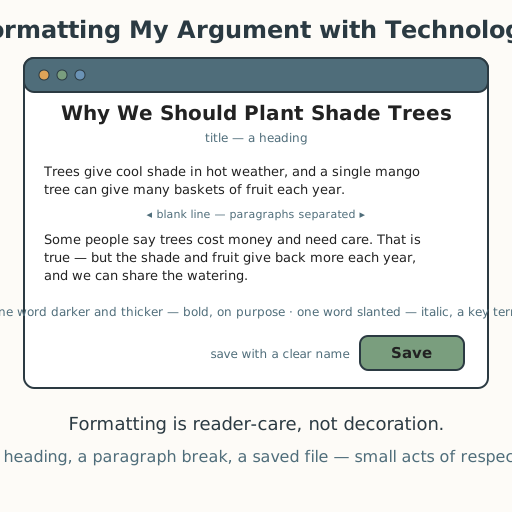
- Formatting poster · 1 A poster of a digital document with its parts labeled — a title/heading, paragraphs, a bold lead, an italic term, a list, and a "save" reminder
- Formatting checklist · 1 per learner A simple checklist — title as heading, paragraphs separated, one bold or italic used on purpose, saved with a clear name
- A device with a writing tool · 1 per learner or pair Any device with a text editor — or paper modeled as a "screen" if no device is available
Low-tech / no-cost
- Paper as a screen Draw a "document" on paper with a title, paragraphs, and one bolded word (dark, thick letters) — practicing the same formatting decisions without a device
- Voice and a 'what would you format?' game Say a piece of writing aloud and have partners name what they would make a heading, what they would bold, and why; no device needed
Enriched / lab & device
- A shared digital document · 1 per group A collaborative document where learners format and revise together in real time, where devices and connectivity allow
- A class digital publication · 1 A shared digital folder, page, or blog where formatted pieces are published for real readers beyond the room
Works in different contexts
- large-group Demonstrate each formatting move on a projected or drawn document, then have learners format their own piece with the checklist and help each other
- multi-age Older learners format a full document and coach younger learners on one move (making a title a heading); younger learners practice that one move
- self-directed A learner opens a writing tool, types their argument, applies the formatting checklist, saves it with a clear name, and re-opens it to check it saved
- level-grouped Learners ready to extend add a second formatting choice (a list for their reasons, an italic for a key term) and explain why each choice helps the reader
- outdoor-only Format on paper-as-screen outdoors — title as a heading, paragraphs, one bolded word — and explain each choice to a partner; no device needed
Lesson 12 — Formatting My Argument with Technology
Summary
Learners use technology to draft, revise, and publish writing with basic formatting. They learn what formatting is for — headings, paragraphs, and intentional bold or italic help a reader — apply a formatting checklist to their argument, and save their work with a clear name. A low-tech “paper as a screen” path keeps the same decisions available without a device.
Objectives
- Use technology to draft, revise, and publish writing, including basic formatting of digital text. (D04.S3.06.02)
Connection
You have read pages that were one solid wall of words, and pages where a title stood at the top, paragraphs were separated, and a few important words were bold or italic. The second was easier to read — not because the words were better, but because the page was formatted to help your eye find its way. Formatting is not decoration; it is a small act of care for your reader. A heading says “this is what it’s about”; a paragraph break says “one idea ends here”; a bold word says “notice this.” Using a device to write is just this care, done on a screen — and done so your work can be saved, shared, and read far beyond one room.
Materials
- Formatting poster
- Formatting checklist
- A device with a writing tool (or paper modeled as a screen)
Preparation
- Print or draw the formatting poster (a labeled document: title, paragraphs, bold, italic, save).
- Copy the formatting checklist for each learner.
- Prepare devices with a text editor if available; otherwise prepare paper-as-screen sheets.
Facilitator note
This lesson is written to the learner (“you”). The idea to land is that formatting is
reader-care, not decoration — headings, paragraphs, and intentional bold/italic make text
easier to enter and navigate. Teach each move with a demonstration (a novice skill; model then
guide — Kirschner, Sweller & Clark, 2006). This is the technology lens in action, held
ethically and egalitarianly: a device is a tool, not a mark of worth; no learner is behind
for lacking one, and the “paper as a screen” path teaches the exact same decisions
(docs/philosophy.md §4). Also name access honestly: not everyone has a device or power or
connectivity, and a tool only serves if it is accessible — a font someone can read, a size
that works for everyone. Retrieval: connect back to the published argument from Lesson 11 —
now you are giving it a readable digital shape. Honor every language and script; formatting
supports any of them.
Procedure
- Gather (5 min). Think of a page that was easy to read and one that was a wall of words. Today you learn the small moves that make the difference: formatting with technology.
- Meet the formatted page (10 min). Look at the poster. A document has a title set large and bold — a heading that says what it’s about. It has paragraphs separated by blank lines — one idea each. One word is bold (“notice this”) and one is italic (a key term). At the bottom, a Save button — the habit that keeps your work from vanishing.
- Learn the checklist (5 min). Four items: (1) title as a heading; (2) paragraphs separated; (3) one bold or italic used on purpose; (4) saved with a clear name. Formatting with a reason beats formatting everywhere — one bold word says more than ten.
- Format your argument (20 min). Open your writing tool (or your paper-as-screen). Type or write your published argument. Then run the checklist: set the title as a heading, separate the paragraphs, bold or italicize one word on purpose, and save it with a name you’ll recognize. Re-open it once to check it saved.
- Close (5 min). Technology can carry your words far — but only if you use it with care. A heading, a paragraph break, a saved file: these are small acts of respect for the person who will read what you wrote.
Differentiation
- Support: Provide the argument already typed; ask the learner to do two moves — make the title a heading and separate the paragraphs — then save it.
- Extension: Add a second formatting choice (a bullet list for the reasons, italics for a key term) and write one sentence explaining why each choice helps the reader.
Assessment
- Formative (portfolio/self): Does the piece show a heading, separated paragraphs, one intentional bold or italic, and a saved file (or a paper-as-screen with the same four choices)?
- Self-check: The learner asks, “If someone opened my document, could they find the title, follow the paragraphs, and see the one thing I wanted them to notice?”
Home connection
Format one real piece of writing — a note, a list, a message — on any device or on paper, giving it a title and paragraphs, and notice whether it is easier for someone else to read.
Resources
- Digital writing tools support drafting, revising, and publishing; see Graham & Perin,
“Writing Next” (Carnegie Corporation, 2007) and the IES “Teaching Secondary Students to
Write Effectively” guide (word processing and collaborative writing). The principle that a
tool is not a mark of worth and access is uneven is a values commitment (
docs/philosophy.md§4) and reflects the digital-divide literature. On explicit instruction for novice skills, see Kirschner, Sweller & Clark (2006).