Lesson 02 — Respect in the Feed: Using Digital Tools Well
Learners practice using digital tools respectfully: pausing before they post, running a message through three gates (true, kind, would-I-want-it-said-about-me), and honoring consent, privacy, and boundaries. They close by drafting a personal "respectful use" rule.
Objectives
Objectives
- D02.S1.10.01 Evaluate how technology and social media shape communication and use digital tools respectfully.
Essential question
How do I use digital tools respectfully — toward others, and toward myself?
Key vocabulary
Materials
Standard materials
- Pause-before-you-post decision card · 1 per learner A three-gate flow — Is it true? Is it kind? Would I want it said/shown about me? — plus a consent-and-privacy check
- Writing journal · 1 per learner
Low-tech / no-cost
- Paper folded into a decision card, or three lines drawn in the ground Three gates marked "true? kind? said about me?" that a learner steps through
- Voice and role-play Practice the pause aloud — say the risky message, then stop, and run it through the three gates
Enriched / lab & device
- A shared device with a message or posting screen open (optional) · 1 per group To practice reading a real draft before sending, using the three gates
- Privacy summary of one popular app (optional) · 1 per pair To examine who can see a post and how to set boundaries
Works in different contexts
- large-group Model the three-gate flow whole-class with one example, then learners run their own drafts through it in pairs
- multi-age Younger learners name one gate ("is it kind?"); older learners run the full flow plus consent, privacy, and footprint
- self-directed A learner runs a real draft of their own through the gates and writes a short reflection on what changed
- level-grouped Learners ready to extend analyze a platform's privacy settings and argue what "respectful by default" would look like
- outdoor-only Pass a written note hand-to-hand and ask before showing it to the group — feeling consent and privacy with no device at all
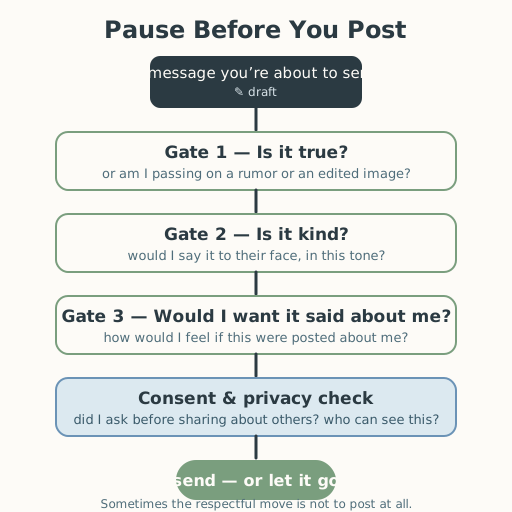
Lesson 2 — Respect in the Feed: Using Digital Tools Well
Summary
Learners turn from what screens change to how to use them respectfully. They practice a pause before posting, run a message through three gates — is it true? is it kind? would I want it said or shown about me? — and honor consent, privacy, and boundaries. They close by writing one personal rule for respectful digital use.
Objectives
- Evaluate how technology and social media shape communication and use digital tools respectfully — the “use it well” half of the standard. (D02.S1.10.01)
Connection
Imagine a photo from a friend’s party appears online — tagged with your name, or with your friend mid-laugh looking silly. No one asked first. Now flip it: you are the one about to post. The pause you take in that moment — should I ask? would they want this shown? would I want it shown about me? — is the whole skill in one breath. Whether your screen is a phone, a shared family device, or a public kiosk, and whether you are in a big city or a small town, respect online is the same as respect anywhere: it is about treating the person on the other side as a person, even when you cannot see their face. Learning to pause, check, and ask is a habit you will carry everywhere.
Materials
- Pause-before-you-post decision card
- Writing journal
Preparation
- Copy or draw the three-gate decision card.
- Retrieval: from Lesson 1, recall that screens hide tone and face, so misreading is common — which is why the pause matters. Today we practice the respectful moves.
- Prepare one worked example of a draft that fails a gate and gets revised.
Facilitator note
This lesson is written to the learner (“you”). The idea to land: respectful digital use is a practiced skill — pause, check the truth and the kindness of a message, ask before sharing others’ words or images, and set boundaries for your own privacy. The anchors are well established: online-safety guidance centers keeping personal information private and telling a trusted adult when something feels wrong (S-127, S-128); media literacy frames asking where information comes from and separating fact from persuasion as a core skill (S-063, S-217); and the reduced-cues picture from Lesson 1 (S-343) explains why a pause is needed. Present these as skills to practice, never as a list of forbidden things — the goal is a learner who acts with care, not fear.
Model the flow once, then let learners practice (worked example → guided practice → independent work; S-011). The ethics lens: respect online is the same ethical work as respect offline — truthfulness, kindness, consent — with a new tool in hand. The egalitarian lens: “respectful use” must not become a lecture aimed only at some learners; everyone posts, everyone is posted about, and everyone’s boundaries count equally. The technology lens: read the defaults — posts are often public-by-default, records persist, and audiences are invisible — and notice that respectful use often means changing a default. The social-emotional lens: this topic touches real moments of hurt, shame, and being left out; invite, never force, and let learners share only what they choose. The critical-thinking lens: “is it true?” means checking before sharing — rumors and edited images spread fast, and a respectful user does not pass them on unchecked (S-063). The global lens: norms of what is respectful differ across cultures and platforms; the three gates are a starting place, not a universal law. Preview: Lesson 3 moves from screens to conflict — how to cool a fire down.
Procedure
- Recall (5 min). From Lesson 1: screens drop tone and face, so the reader guesses. That is why we pause. Today we learn the pause itself.
- Meet the three gates (10 min). Look at the decision card. Watch a worked example: a draft that says “you always ruin everything.” Run it through the gates — is it true? (no — “always” is not true), is it kind? (no), would I want it said about me? (no). Revise it: “I felt hurt when that happened. Can we talk?” Notice what changed.
- Learn the consent and privacy check (10 min). Before sharing anything about another person — a photo, a story, a tag — ask yourself: did I ask? would they want this shown? And for yourself: who can see this? Learn that posts are often public-by-default and that what is posted tends to persist, so choosing who can see your words and pictures is part of respect (S-127, S-128).
- Practice the pause (15 min). Write a real draft — a message you have wanted to send, or one you have seen sent. Run it through the three gates one at a time. Revise it so it can pass (or decide it should not be sent at all — sometimes the respectful move is not to post).
- Draft your rule (10 min). In your journal, write one personal rule: before I post, I will ___; and I will not share about others without ___.
- Close (5 min). Remember: the person on the other side is a person. A pause, a check, and a question are all the respect you need to start with.
Differentiation
- Support: Offer a two-gate version (“true? kind?”) and a sentence starter (“Before I post I will ___ so that ___.”).
- Extension: Analyze a platform’s default privacy settings and redesign them so the default is respectful — then argue for your change.
Assessment
- Formative (self): Can the learner run a draft through the three gates, name the consent check, and state one personal rule for respectful use?
- Portfolio artifact (summative for the unit): The personal “respectful use” rule, added to the unit portfolio as the “digital tools used well” reflection.
Home connection
Ask an adult you trust: what is one rule you follow before you share something online — and why? Compare your rule with theirs.
Resources
- On keeping personal information private and telling a trusted adult when something feels wrong online: UNICEF, “Keeping children safe online,” https://www.unicef.org/protection/violence-against-children-online (S-127); ITU, “Child Online Protection,” https://www.itu.int/en/ITU-D/Cybersecurity/Pages/COP.aspx (S-128).
- On asking where information comes from and separating fact from persuasion: Common Sense Education, “News & Media Literacy” (S-063); UNESCO, “Media and Information Literacy” (S-217).
- On the reduced-cues account behind the pause: Suler (2004), “The Online Disinhibition Effect,” https://doi.org/10.1089/1094931041291295 (S-343).
- On modeling + guided practice before independent work: Kirschner, Sweller & Clark (2006), https://doi.org/10.1207/s15326985ep4102_1 (S-011).