Lesson 13 — Multimodal Composition, Accessible by Design
Learners compose a multimodal text — combining words, image, sound, and design — and make it accessible by design: alt text and captions, readable contrast, clear structure, and a text version of any sound. They plan, build, and test one piece with an accessibility checklist.
Objectives
Objectives
- D04.S3.10.02 Compose multimodal texts that combine writing, image, sound, and design, with attention to accessibility.
Essential question
How do I compose a text that combines writing, image, sound, and design — and make it work for *everyone*, not just some readers?
Key vocabulary
Materials
Standard materials
- Multimodal planner · 1 per learner Four quadrants — words, image, sound, design — plus an accessibility checklist
- Accessibility checklist · 1 per learner Plain captions and alt text, readable contrast, clear headings, a text version of any sound, and simple navigation
- Art supplies or a device · per learner Paper, pens, or a simple tool to combine image and text
Low-tech / no-cost
- Paper, pen, and voice Compose a two-mode piece — a drawing with a written and a spoken description — using no device at all
- A partner as "screen reader" One learner describes the image aloud to a blindfolded or eyes-closed partner to test whether the piece works without sight
Enriched / lab & device
- A device with a simple layout or slides tool (optional) · 1 per learner or pair To combine text, image, and a recorded sound clip into one piece
- A screen reader or read-aloud tool (optional) · 1 per class To test whether the piece's alt text and structure actually work for a non-visual reader
Works in different contexts
- large-group Model the planner whole-class, then learners build their piece in pairs; a few present and the room runs the accessibility checklist on them
- multi-age Younger learners combine two modes (image + text); older learners combine all four and complete the full accessibility checklist
- self-directed A learner plans, builds, and self-tests a multimodal piece using the accessibility checklist, then shares it with one trusted reader
- level-grouped Learners ready to extend apply the four WCAG principles — perceivable, operable, understandable, robust — to their own piece and a peer's
- outdoor-only Build the piece from found materials and the spoken word, and test accessibility by having a partner experience it with eyes closed or at a distance
Lesson 13 — Multimodal Composition, Accessible by Design
Summary
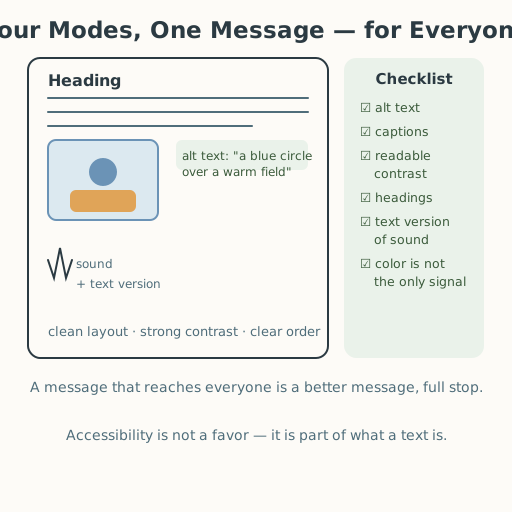
Learners compose a multimodal text — combining words, image, sound, and design — and make it accessible by design: alt text and captions, readable contrast, clear structure, and a text version of any sound. They plan, build, and test one piece with an accessibility checklist, learning that accessibility is not an afterthought but part of what a text is.
Objectives
- Compose multimodal texts that combine writing, image, sound, and design, with attention to accessibility. (D04.S3.10.02)
Connection
Think of the last thing you actually paid attention to — a poster, a video, a post, a flyer for a community event. It worked because it combined more than words: an image caught your eye, a layout guided you, maybe a sound or a color carried a feeling. Now imagine you could not see the image, or could not hear the sound, or the text was too faint to read. If the maker built it well, you would still get the whole message — because a good multimodal text carries its meaning in more than one channel at once. Accessibility is not a special favor for a few people; it is the difference between a message that reaches some people and one that reaches everyone.
Materials
- Multimodal planner (four quadrants + accessibility checklist)
- Accessibility checklist
- Art supplies or a device
Preparation
- Copy the planner and checklist.
- Retrieval: from Lessons 11–12, recall sentence craft and tone. Today those become one mode among four, and accessibility joins the craft.
- Prepare one worked example: a simple poster or slide with a missing alt text and weak contrast, to fix together.
Facilitator note
This lesson is written to the learner (“you”). The idea to land: a multimodal text
combines writing, image, sound, and design into one message, and accessibility — alt
text, captions, readable contrast, clear structure, and a text version of sound — is a
design requirement, not a favor. The international standard is WCAG, organized around
four principles: content must be perceivable, operable, understandable, and
robust (S-280). At this level, learners meet a practical subset: every image has a
caption and alt text; color is never the only signal; contrast is readable; headings
give structure; and any sound has a text version. These are the same skills the
curriculum’s own graphics follow (see docs/art-style.md).
Model the skill once, then let learners practice (worked example → guided practice → independent work; S-011). The technology lens is the spine: read the medium — how an image, a sound, and a layout each carry meaning, and how a design choice includes or excludes. The egalitarian lens is the heart: accessibility is justice — a text that a screen reader, a hard-of-hearing learner, or a low-vision reader cannot use is a text that has silently chosen its audience; the digital divide (S-281) also decides who can even reach the tool, so keep a paper path open. The ethics lens: building for everyone, not just the “typical” user, is a moral commitment, and it is also simply better craft. The global lens: accessibility needs and norms differ across languages, scripts, and cultures — right-to-left scripts, tone languages, sign languages — so “accessible” is context-dependent, and multilingual learners can extend a piece into two languages. The critical-thinking lens: test your own piece with the checklist, and let a partner experience it without one sense to find what you missed. Preview: Lesson 14 turns from how we compose to who holds power in language.
Procedure
- Recall (5 min). From Lessons 11–12, you learned to craft words. Today you add image, sound, and design — and one more demand: that the piece work for everyone.
- Meet the four modes (10 min). Look at the multimodal planner’s four quadrants: words (the writing), image (a picture, symbol, or chart), sound (spoken word, music, or a voice note), and design (layout, color, order). A strong piece uses more than one so the message survives even if one channel fails.
- Meet the accessibility checklist (15 min). Read the checklist: every image has a caption and alt text (words that describe it for someone who cannot see it); color is never the only signal; contrast is strong enough to read; headings give structure; and any sound has a text version. Watch a worked example: a slide with no alt text and faint text — fix it together.
- Plan and build your piece (20 min). Choose a real message to share — an invitation, a how-to, a small argument, or an announcement. Plan all four modes, then build your piece (on paper or a device). Write the alt text and caption for your image, and a text version of any sound.
- Test it (7 min). Swap with a partner. They close their eyes (or imagine they cannot see the image) and tell you the message from your alt text and words alone; then they check contrast, headings, and the sound’s text version. Fix one thing they found.
- Close (3 min). Remember: a message that reaches everyone is a better message, full stop. Next time, we ask whose language has power — and whose does not.
Differentiation
- Support: Build a two-mode piece (image + text) with a provided alt-text frame, and complete a three-item accessibility checklist.
- Extension: Build all four modes and apply the four WCAG principles — perceivable, operable, understandable, robust — to your own piece and a peer’s, with evidence for each (S-280).
Assessment
- Formative (self + peer): Does the piece combine at least two modes, and does it pass the accessibility checklist — alt text/caption, readable contrast, structure, and a text version of any sound?
- Portfolio artifact (unit): The multimodal piece, added to the portfolio as the “accessible multimodal composition” the unit’s assessment plan calls for.
Home connection
Show your piece to someone at home and ask them to experience it once with their eyes closed, then once with sound off. Whatever still works is the accessibility doing its job — and whatever does not is your next fix.
Resources
- On the accessibility standard and its four principles: W3C WAI, “Web Content Accessibility Guidelines,” https://www.w3.org/WAI/standards-guidelines/wcag/ (S-280).
- On unequal access to digital tools (the digital divide): World Bank, World Development Report 2016: Digital Dividends (S-281).
- On modeling + guided practice before independent work: Kirschner, Sweller & Clark (2006), https://doi.org/10.1207/s15326985ep4102_1 (S-011).